
Changing URL for the Webservice datacontrol
ADF Ui Pages can be based on Webservice datacontrols to show the information fetched from webservices.
During Development the Ui might be based on services deployed in Developement server/Mock services running on tools like SOAP UI. When this UI moves to Integrated Test environment/Pre-Production Environment/Production Environment, the endpoints of the services used will change.
To make the UI work in all the environments, the endpoint URL's have to be changed based on the environment in which the UI is deployed.
(HERE I AM ASSUMING THAT THERE IS NO UDDI REGISTRY INVOLVED and this assumption is true in most of the client sites. If the UDDI registry is involved then there is nothing to change in the UI side. Everything will be maintained/changed only in the UDDI. If multiple UDDI registries are involved then again the url to the UDDI registry has to be changed in the UI.).
In ADF, the information about the service being invoked is present in the "connections.xml" file. This information includes things like the WSDL url, the endpoint etc. This information can be changed manually by changing the values of the following .
When you run the UI, it will start making calls to the new location instead of the old one.
Instead of changing this information manually, the above series of steps can be performend using an automated script (like ant/custom java /perl script) as well.
During Development the Ui might be based on services deployed in Developement server/Mock services running on tools like SOAP UI. When this UI moves to Integrated Test environment/Pre-Production Environment/Production Environment, the endpoints of the services used will change.
To make the UI work in all the environments, the endpoint URL's have to be changed based on the environment in which the UI is deployed.
(HERE I AM ASSUMING THAT THERE IS NO UDDI REGISTRY INVOLVED and this assumption is true in most of the client sites. If the UDDI registry is involved then there is nothing to change in the UI side. Everything will be maintained/changed only in the UDDI. If multiple UDDI registries are involved then again the url to the UDDI registry has to be changed in the UI.).
In ADF, the information about the service being invoked is present in the "connections.xml" file. This information includes things like the WSDL url, the endpoint etc. This information can be changed manually by changing the values of the following .
- Identify the "wsconnection" XML element that corresponds to the service being invoked.
- Change the "description" attribute of this element to point to appropriate WSDL url.
- Identify the "service" XML element in the "wsconnection" element and within that element search for the element which looks like
Change the "addressUrl" attribute so that it points to the appropriate endpoint.
When you run the UI, it will start making calls to the new location instead of the old one.
Instead of changing this information manually, the above series of steps can be performend using an automated script (like ant/custom java /perl script) as well.
Tuesday, March 20, 2012
at 3:58 PM
- 0 Comments


Important ADF related links
http://www.oracle.com/technetwork/developer-tools/adf/learnmore/index-101235.html
The above link contains a lot of links for common adf problems and their solutions.
http://www.oracle.com/technetwork/developer-tools/adf/queueactioneventinregion-155252.html
The above link shows how the parent page can programmatically control navigation inside a region.
http://blogs.oracle.com/groundside/entry/adventures_in_adf_logging_part
The above link contains information about ADF logger.
http://niallcblogs.blogspot.com/2011/12/bpm-11g-feature-pack-update-task.html
This link contains important bpm 11g related blogs
The above link contains a lot of links for common adf problems and their solutions.
http://www.oracle.com/technetwork/developer-tools/adf/queueactioneventinregion-155252.html
The above link shows how the parent page can programmatically control navigation inside a region.
http://blogs.oracle.com/groundside/entry/adventures_in_adf_logging_part
The above link contains information about ADF logger.
http://niallcblogs.blogspot.com/2011/12/bpm-11g-feature-pack-update-task.html
This link contains important bpm 11g related blogs
Wednesday, January 4, 2012
at 8:04 PM
- 0 Comments
ADF remote taskflows
The following are some of the things that needs to be remembered when using remote taskflows.
- Remote taskflow activities can only invoke remote bounded taskflows with JSPX pages.
- Remote taskflow activities cannot be used in the taskflows with page fragments.
- The only way to use the remote taskflows inside a page fragment is by having inline frames in the page fragment and point it to a local taskflow with JSPX pages having the remote taskflow activity. The communication between the content of the iniline frame and the parent page/pageFragement can be done using java script.
- The calling taskflow does not propagate the security information to the remote taskflow if the remote taskflow is running in a different server.
at 3:29 PM
- 0 Comments
Enabling sql trace and testing in ADFbc
Follow the information in the following URL to enabling sql trace.
http://radio-weblogs.com/0118231/stories/2005/06/22/verifyingEffectivenessOfViewObjectFetchSizeUsingSqlTrace.html
In order to easily identify the trace file you can set the trace file identifier as follows in ur AM..
getDBTransaction().executeCommand("ALTER SESSION SET tracefile_identifier = mysqltrace");
http://radio-weblogs.com/0118231/stories/2005/06/22/verifyingEffectivenessOfViewObjectFetchSizeUsingSqlTrace.html
In order to easily identify the trace file you can set the trace file identifier as follows in ur AM..
getDBTransaction().executeCommand("ALTER SESSION SET tracefile_identifier = mysqltrace");
Friday, August 12, 2011
at 4:50 PM
- 0 Comments
MDS-00035: cannot load the class:xxxxxx
In the cases where you want to use your own Customization Class, make sure that this java class is available to jdeveloper when it restarts. Otherwise , when you use the "Customization Developer" role, you will see that in the Jdeveloper you will see messages like
MDS-00035: cannot load the class:xxxxx
and the customization context will be "none".
To prevent this one way is to create a jar file containing your Customization class and place it in
All the jar files placed in this directory are avaliable in the CLASSPATH when jdev restarts.
Tuesday, July 12, 2011
at 8:21 PM
- 0 Comments
Zero Swap space installation error (on windows)
While installing soa suite, you might get an error saying that it failed some checks and one of them might be "Zero Swap space while the recommended one is 512MB".
One windows if you get this error then just follow the steps below to set the virtual memory space and restart the machine and try to re install SOA suite.
1) Right click My Compter.
2) Select "Properties" from the context menu.
3) Select Advanced Settings
4) In the dialog that shows up select the "Settings" button in the "Performance" section
5) In the new dialog select "Advanced"
6) In the "Virtual Memory" section click the "Change" button.
7) Now deselect "Automatically manage paging file size for all drivers"
8) Now select "Custom size" and provide "Initial size" of 2 GB and Maximum size of "4 GB".
9) Click "Ok" in all the windows ..
Now restart the machine and try re-installing the soa suite.
One windows if you get this error then just follow the steps below to set the virtual memory space and restart the machine and try to re install SOA suite.
1) Right click My Compter.
2) Select "Properties" from the context menu.
3) Select Advanced Settings
4) In the dialog that shows up select the "Settings" button in the "Performance" section
5) In the new dialog select "Advanced"
6) In the "Virtual Memory" section click the "Change" button.
7) Now deselect "Automatically manage paging file size for all drivers"
8) Now select "Custom size" and provide "Initial size" of 2 GB and Maximum size of "4 GB".
9) Click "Ok" in all the windows ..
Now restart the machine and try re-installing the soa suite.
Tuesday, July 5, 2011
at 2:02 PM
- 0 Comments
XA recovery requirements
XA requirements: The database adapter participates in distributed transactions and requires the back-end database setup for XA recovery by Oracle WebLogic Transaction Manager. Ensure that XA pre-requisites are met. For this, log on to SQL*Plus as a system user, for example, enter sqlplus "/ as sysdba" and then grant the following privileges:
Sql>Grant select on sys.dba_pending_transactions to public.
Sql>Grant execute on sys.dbms_xa to public.
Sql>Grant force any transaction to public;
Sql>Grant select on sys.dba_pending_transactions to public.
Sql>Grant execute on sys.dbms_xa to public.
Sql>Grant force any transaction to public;
Monday, July 4, 2011
at 2:12 PM
- 0 Comments
Multiple AM's and Multiple Databases and Taskflows
In many cases you might have to pull data from different databases to show appropriate information in the UI. The crudest way is to use JDBC to fetch data from all the different databases.
If you want to ADFbc then you can have multiple AM's pointing to different databases. But if you want to use the datacontrols properly inside a taskflow (actually any page fragment as well), then you definitely have to understand the how ADFc layer creates the AM instances.
The following blog definitely helps you regarding all the information you need regarding taskflows and the how ADFbc goes hand in hand.
http://one-size-doesnt-fit-all.blogspot.com/2011/05/jdev-11g-task-flows-adf-bc-one-root.html
If you want to ADFbc then you can have multiple AM's pointing to different databases. But if you want to use the datacontrols properly inside a taskflow (actually any page fragment as well), then you definitely have to understand the how ADFc layer creates the AM instances.
The following blog definitely helps you regarding all the information you need regarding taskflows and the how ADFbc goes hand in hand.
http://one-size-doesnt-fit-all.blogspot.com/2011/05/jdev-11g-task-flows-adf-bc-one-root.html
at 1:07 PM
- 0 Comments
LOV and view accessor for shared am
In 11.1.1.2, there seems to be a bug in ADFbc. If you have a LOV based on a view accessor of a shared AM view object and if you apply a view criteria on top of it, initially the view critieria is applied but one you change the value of the LOV no view criteria is applied and you will see all the values from the LOV vo.
The workaround to this problem is to make sure of the following.
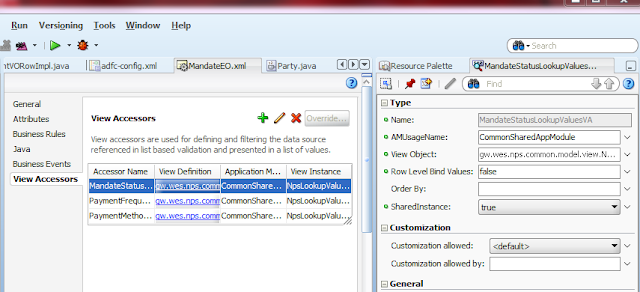
To know more about the "SharedInstance" property look at the following.
http://forums.oracle.com/forums/thread.jspa?threadID=2162952
The workaround to this problem is to make sure of the following.
- In the entity object which has to view accessor, set the "Row Level Bind Values" to false.
- Set the "Shared Instance" property of the view accessor in the EO to "true".

To know more about the "SharedInstance" property look at the following.
http://forums.oracle.com/forums/thread.jspa?threadID=2162952
Wednesday, June 15, 2011
at 1:19 PM
- 0 Comments
Mediator SOAP header filtering
This post is all about how to access the SOAP headers using the mediator component in the oracle soa suite 11g.
Before looking at the steps to be followed to access the SOAP headers, first we need to understand the following things.
A SOAP message is made of an envelope and zero or more attachments..

A SOAP envelope is made of optional header and mandatory body parts..
Headers are always handled (or processed) by the intermediaries...and the
body is always handled (or processed) by the ultimate receiver..
The header is generally used for providing some contextual information, like, providing authentication related information, or providing transaction related information etc...
Headers are used to represent that some special processing is required. Most of the WS-* standards use the header section to represent the special processing required . For example WS-Addresssing using this header section to represent where the ReplyTo message has to be sent.
Constructing WSDL
The following video shows how to construct the WSDL..It uses the jdeveloper tool to create and edit the WSDL file.
Way to populate SOAP headers
The following video shows how to use BPEL component to populate SOAP headers in the SOAP message.
Accessing SOAP header values
The following video shows how to access the SOAP header values in mediator.
Before looking at the steps to be followed to access the SOAP headers, first we need to understand the following things.
- SOAP Message structure (This is required to understand where actually the SOAP body message and SOAP headers reside in the entire message).
- Constructing WSDL to specify that SOAP headers will be accessed. (Without this jdeveloper design time cannot help you to build expressions using which you can access SOAP headers at run time).
- Way to populate the SOAP headers ( We will be using BPEL component to achieve this)
- Accessing the SOAP header value (We will be suing the Mediator component to achieve this).
A SOAP message is made of an envelope and zero or more attachments..

A SOAP envelope is made of optional header and mandatory body parts..
Headers are always handled (or processed) by the intermediaries...and the
body is always handled (or processed) by the ultimate receiver..
The header is generally used for providing some contextual information, like, providing authentication related information, or providing transaction related information etc...
Headers are used to represent that some special processing is required. Most of the WS-* standards use the header section to represent the special processing required . For example WS-Addresssing using this header section to represent where the ReplyTo message has to be sent.
Constructing WSDL
The following video shows how to construct the WSDL..It uses the jdeveloper tool to create and edit the WSDL file.
Way to populate SOAP headers
The following video shows how to use BPEL component to populate SOAP headers in the SOAP message.
Accessing SOAP header values
The following video shows how to access the SOAP header values in mediator.
Sunday, May 29, 2011
at 8:47 PM
- 2 Comments
Disabling all oracle DB constraints of all tables
Just run the following plsql block.
BEGIN
FOR c IN
(SELECT c.owner, c.table_name, c.constraint_name
FROM user_constraints c, user_tables t
WHERE c.table_name = t.table_name
AND c.status = 'ENABLED'
ORDER BY c.constraint_type DESC)
LOOP
dbms_utility.exec_ddl_statement('alter table ' || c.owner || '.' || c.table_name || ' disable constraint ' || c.constraint_name|| ' cascade');
END LOOP;
END;
/
BEGIN
FOR c IN
(SELECT c.owner, c.table_name, c.constraint_name
FROM user_constraints c, user_tables t
WHERE c.table_name = t.table_name
AND c.status = 'ENABLED'
ORDER BY c.constraint_type DESC)
LOOP
dbms_utility.exec_ddl_statement('alter table ' || c.owner || '.' || c.table_name || ' disable constraint ' || c.constraint_name|| ' cascade');
END LOOP;
END;
/
Thursday, May 26, 2011
at 6:17 PM
- 0 Comments
Application Module - Fail over feature
What is the fail over feature provided by the Application Module?
The fail over feature decides when and how often passivation happens. When this feature is turned on, the application module state is turned on everytime an application module instance is returned back to the AM pool by the data control.
The advantage of this feature is that the user application state (model state), remains intact.
When should this feature be enabled/used?
This feature should be enabled only in the applications where its absolutely critical not to lose the data entered by the users at any cost.
Mostly it should be enabled, when we are dealing with a clustered environment.
When should we keep away from using this feature?
When this feature is enabled, passivation/activation happens for every request. This brings down the performance of the system . So in applications where its not critical to lose data, do no enable this feature. Especially when we are not dealing with a clustered environment then do not enable this feature.
How to enable/disable it?
This feature can be enabled or disabled by selection appropriate properties in the application module configuration on the Pooling and Scalability tab of the Business Components Configuration dialog.
What is the default configuration?
This feature is disabled by default.
The fail over feature decides when and how often passivation happens. When this feature is turned on, the application module state is turned on everytime an application module instance is returned back to the AM pool by the data control.
The advantage of this feature is that the user application state (model state), remains intact.
When should this feature be enabled/used?
This feature should be enabled only in the applications where its absolutely critical not to lose the data entered by the users at any cost.
Mostly it should be enabled, when we are dealing with a clustered environment.
When should we keep away from using this feature?
When this feature is enabled, passivation/activation happens for every request. This brings down the performance of the system . So in applications where its not critical to lose data, do no enable this feature. Especially when we are not dealing with a clustered environment then do not enable this feature.
How to enable/disable it?
This feature can be enabled or disabled by selection appropriate properties in the application module configuration on the Pooling and Scalability tab of the Business Components Configuration dialog.
What is the default configuration?
This feature is disabled by default.
Monday, May 23, 2011
at 7:48 PM
- 0 Comments
Creating or cloning a new MDS partition in a MDS repository
To create or clone a new partition in a MDS repository look into the following documentation
http://download.oracle.com/docs/cd/E14571_01/core.1111/e10105/repos.htm#CIHIDABJ
13.3.6.1 Cloning a Partition
Wednesday, October 6, 2010
at 11:41 AM
- 0 Comments
Creating a new soa composite grouping partition
In many cases you might want to group the soa composites so that it is easy to identify the required composite.
The best way to do this is to create a new partition and deploy the related soa composites to this partiton.
By default , if you don't speciy the partition name, all the composites are deployed to the "default" partition.
This blog shows how to create a new partition using the oracle fusion middleware enterprise manager console.
- Log into the em console
- Expand the SOA node on the Left hand side navigation pane.
- Select the "soa-infra (server name)" node .
- On the Righthand side select the "soa-infrastructure" related menu and select the menu "Manage Partitions"
- Now Create a new partition using the "create" icon.
at 11:12 AM
- 0 Comments
EJB's and Exceptions
EJB's and Exceptions
From an EJB method, if any unchecked excpetion is thrown, then it will be encapsulated in EJBException object...All checked exceptions are propagated without getting encapsulated by any other exception..
This is true for both Stateful and Stateless EJB's
Session Beans and Exceptions
Whenever an EJB method throws any uncheked exception, then the container invalidates the EJB instance...During this process the container does'nt call the lifecycle listener method marked with PreDestroy...
When a checked exception is thrown, then the EJB instance is not invalidated...
When we say invalidated, it can mean many things..Its exactly implementation depends on the Application Server...However, the main thing to know is that, all further EJB method calls will be dealt by a different EJB instance...Some servers, might destroy the EJB completely...while some servers, return the instance to the EJB instance pool...
For Stateful Bean also when an Unchecked exception is thrown, the EJB Bean is completely destroyed...So we cannot call any other methods of the stateful EJB bean once an Uncheked exception is thrown (In case of stateful EJB, we can continue calling EJB methods, as a new EJB instance will be assigned for each method invocation)...For Checked exception, there is no problem...just like in stateless EJB..
@PreDestroy lifecycle callback method
The @PreDestroy method may not be called in all situations...When a Bean (stateful or stateless) is invalidated then the method marked with the annotation "PreDestroy" does'nt get called...When the session bean timesout, the server may not call this lifecycle method (You have to contact the server doc for this)..
When a stateful bean has a method that is marked with the @Remove annotation and when the client calls this method, then the method marked with the annotation @PreDestroy will be called...
NOTE: When a method is marked with @Remove and @PreDestroy, then the method will be called twice when a client invokes the method once...
Wednesday, December 2, 2009
at 5:14 PM
- 0 Comments
JavaEE servlets important tags and their usage
An example of how to use resource-ref tag is provided at the following location..
http://onjava.com/pub/a/onjava/excerpt/jsvltjspckbk_chap01/index.html?page=2
An example of how to use resource-env-ref tag in the DD is provided at the following location...
http://tomcat.apache.org/tomcat-5.5-doc/jndi-resources-howto.html
Saturday, November 7, 2009
at 1:24 PM
- 0 Comments
mime-mapping
A servlet may need to know which MIME type a file extension corresponds to , and such a mapping needs to be specified as follows..
<mime-mapping>
<extension>txt</extension>
<mime-type>text/html</mime-type>
</mime-mapping>
In the service/doGet/doPost methods, use the following code to determine the mimetype of the file
String mimeType=this.getServletContext().getMimeType("pathOfTheFile.txt");
response.setContentType(mimeType);
at 1:14 PM
- 0 Comments
EL expressions
EL expressions handle null values gracefully in some cases...The following are the cases..
- If the EL expression is of the following form ${attribute.xxxxxx} or ${bean.xxxx} and if the "attribute" or "bean" is not present in any of the scopes
- If the EL expression is of the following form ${map.key.xxxx} and if the key is not present in the map
- If the EL expression is of the following form ${list_or_array[index]} and even if the index value is out of bounds..
- If the EL expresseion is of the following form ${bean.property} or ${bean["property"]} and if the "property" is not present in the bean.
Wednesday, October 21, 2009
at 7:30 PM
- 0 Comments


